Internet Technologies - Quick Reference Guide
Internet
Internet is a world-wide global system of interconnected computer networks.
Internet uses the standard Internet Protocol (TCP/IP).
Every computer in internet is identified by a unique IP address.
IP Address is a unique set of numbers (such as 110.22.33.114) which identifies a computer location.
A special computer DNS (Domain Name Server) is used to give name to the IP Address so that user can locate a computer by a name.
Internet is accessible to every user all over the world.
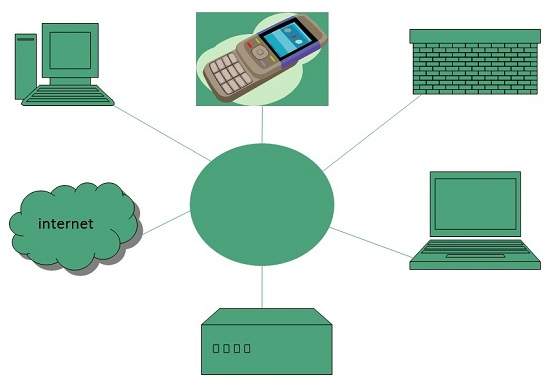
Internet Evoloution
The concept of Internet was originated in 1969 and has undergone several technological & Infrastructural changes as discussed below:
The origin of Internet devised from the concept of Advanced Research Project Agency Network (ARPANET).
ARPANET was developed by United States Department of Defense.
Basic purpose of ARPANET was to provide communication among the various bodies of government.
Initially, there were only four nodes, formally called Hosts.
In 1972, the ARPANET spread over the globe with 23 nodes located at different countries and thus became known as Internet.
By the time, with invention of new technologies such as TCP/IP protocols, DNS, WWW, browsers, scripting languages etc.,Internet provided a medium to publish and access information over the web.
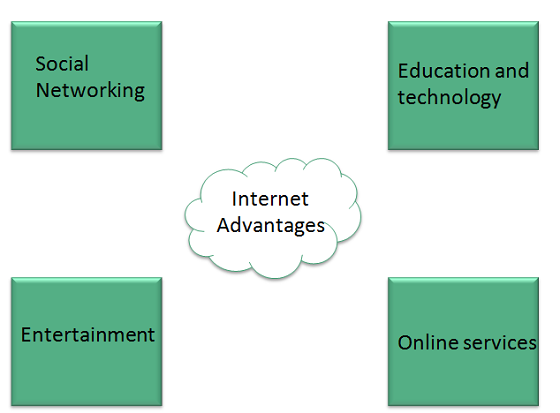
Internet Advantages
Internet covers almost every aspect of life, one can think of. Here, we will discuss some of the advantages of Internet:
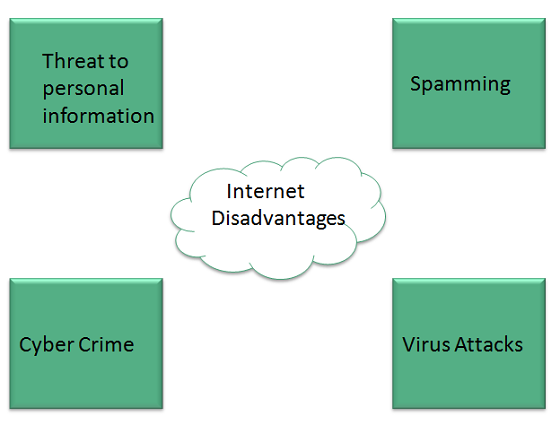
Internet Disadvantages
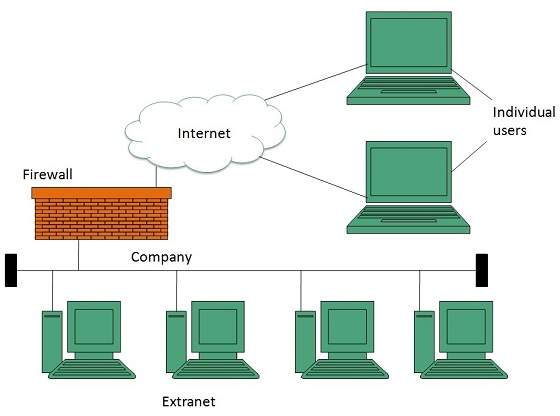
Extranet
Extranet refers to network within an organization, using internet to connect to the outsiders in controlled manner. It helps to connect businesses with their customers and suppliers and therefore allows working in a collaborative manner.
Extranet Benefits
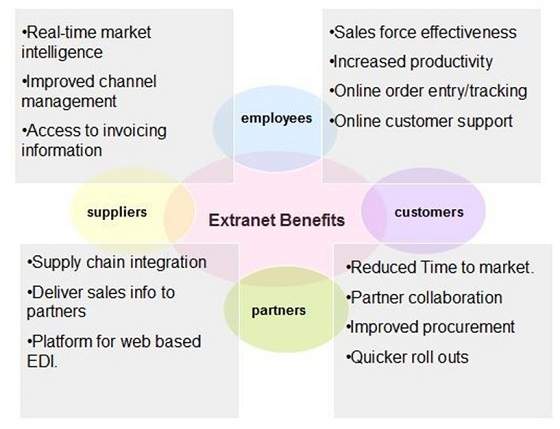
Extranet proves to be a successful model for all kind of businesses whether small or big. Here are some of the advantages of extranet for employees, suppliers, business partners, and customers:
Extranet Issues
Apart for advantages there are also some issues associated with extranet. These issues are discussed below:
Hosting
Where the extranet pages will be held i.e. who will host the extranet pages. In this context there are two choices:
Host it on your own server.
Host it with an Internet Service Provider (ISP) in the same way as web pages.
But hosting extranet pages on your own server requires high bandwidth internet connection which is very costly.
Security
Additional firewall security is required if you host extranet pages on your own server which result in a complex security mechanism and increase work load.
Accessing Issues
Information can not be accessed without internet connection. However, information can be accessed in Intranet without internet connection.
Decreased Interaction
It decreases the face to face interaction in the business which results in lack of communication among customers, business partners and suppliers.
Extranet vs. Intranet
The following table shows differences between Extranet and Intranet:
ExtranetIntranetInternal network that can be accessed externally.Internal network that can not be accessed externally.Extranet is extension of company's Intranet.Only limited users of a company.For limited external communication between customers, suppliers and business partners.Only for communication within a company.
Internet Reference Models
OSI Reference Model
OSI is acronym of Open System Interface. This model is developed by the International organization of Standardization (ISO) and therefore also referred as ISO-OSI Model.
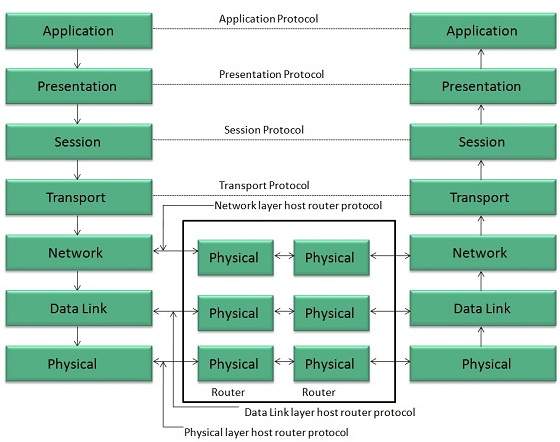
The OSI model consists of seven layers as shown in the following diagram. Each layer has a specific function, however each layer provide services to the layer above.
PHYSICAL LAYER
The Physical layer is responsible for the following activities:
Activating, maintaining and deactivating the physical connection.
Defining voltages and data rates needed for transmission.
Converting digital bits into electrical signal.
Deciding whether the connection is simplex, half duplex or full duplex.
DATA LINK LAYER
The data link layer performs the following functions:
Performs synchronization and error control for the information which is to be transmitted over the physical link.
Enables error detection, and adds error detection bits to the data which are to be transmitted.
NETWORK LAYER
Following are the functions of Network Layer:
To route the signals through various channels to the other end.
To act as the network controller by deciding which route data should take.
To divide the outgoing messages into packets and to assemble incoming packets into messages for higher levels.
TRANSPORT LAYER
The Transport layer performs the following functions:
It decides if the data transmission should take place on parallel paths or single path.
It performs multiplexing, splitting on the data.
It breaks the data groups into smaller units so that they are handled more efficiently by the network layer.
The Transport Layer guarantees transmission of data from one end to other end.
SESSION LAYER
The Session layer performs the following functions:
Manages the messages and synchronizes conversations between two different applications.
It controls logging on and off, user identification, billing and session management.
PRESENTATION LAYER
The Presentation layer performs the following functions:
This layer makes it sure that the information is delivered in such a form that the receiving system will understand and use it.
APPLICATION LAYER
The Application layer performs the following functions:
It provides different services such as manipulation of information in several ways, retransferring the files of information, distributing the results etc.
The functions such as LOGIN or password checking are also performed by the application layer.
TCP/IP Reference Model
TCP/IP model is practical model and is used in the Internet. TCP/IP is acronym of Transmission Control Protocol and Internet Protocol.
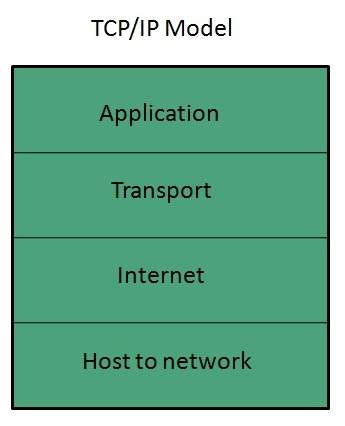
The TCP/IP model combines the two layers (Physical and Data link layer) into one layer i.e. Host-to-Network layer. The following diagram shows the various layers of TCP/IP model:
APPLICATION LAYER
This layer is same as that of the OSI model and performs the following functions:
It provides different services such as manipulation of information in several ways, retransferring the files of information, distributing the results etc.
The functions such as LOGIN or password checking are also performed by the application layer.
Protocols used: TELNET, FTP, SMTP, DN, HTTP, NNTP are the protocols employed in this layer.
TRANSPORT LAYER
It does the same functions as that of transport layer in OSI model. Here are the key points regarding transport layer:
It uses TCP and UDP protocol for end to end transmission.
TCP is reliable and connection oriented protocol.
TCP also handles flow control.
The UDP is not reliable and a connection less protocol also does not perform flow control.
Protocols used: TCP/IP and UDP protocols are employed in this layer.
INTERNET LAYER
The function of this layer is to allow the host to insert packets into network and then make them travel independently to the destination. However, the order of receiving the packet can be different from the sequence they were sent.
Protocols used: Internet Protocol (IP) is employed in Internet layer.
HOST-TO-NETWORK LAYER
This is the lowest layer in TCP/IP model. The host has to connect to network using some protocol, so that it can send IP packets over it. This protocol varies from host to host and network to network.
Protocols used: ARPANET, SATNET, LAN, packet radio are the protocols which are used in this layer.
Domain Name System Architecture
The Domain name system comprises of Domain Names, Domain Name Space, Name Server that have been described below:
Domain Names
Domain Name is a symbolic string associated with an IP address. There are several domain names available; some of them are generic such as com, edu, gov, net etc, while some country level domain names such as au, in, za, usetc.
The following table shows the Generic Top-Level Domain names:
Domain NameMeaningComCommercial businessEduEducationGovU.S. government agencyIntInternational entityMilU.S. militaryNetNetworking organizationOrgNon profit organization
The following table shows the Country top-level domain names:
Domain NameMeaningauAustraliainIndiaclChilefrFranceusUnited StateszaSouth AfricaukUnited KingdomjpJapanesSpaindeGermanycaCanadaeeEstoniahkHong Kong
Domain Name Space
The domain name space refers a hierarchy in the internet naming structure. This hierarchy has multiple levels (from 0 to 127), with a root at the top. The following diagram shows the domain name space hierarchy:
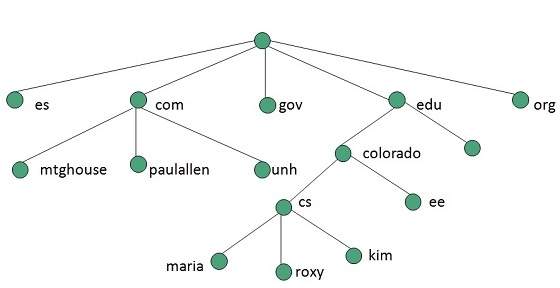
In the above diagram each subtree represents a domain. Each domain can be partitioned into sub domains and these can be further partitioned and so on.
Name Server
Name server contains the DNS database. This database comprises of various names and their corresponding IP addresses. Since it is not possible for a single server to maintain entire DNS database, therefore, the information is distributed among many DNS servers.
Hierarchy of server is same as hierarchy of names.
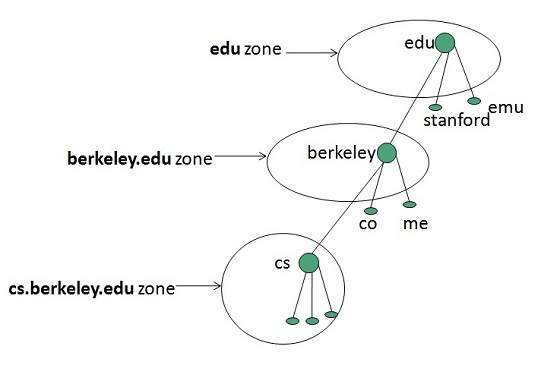
The entire name space is divided into the zones
Zones
Zone is collection of nodes (sub domains) under the main domain. The server maintains a database called zone file for every zone.

No comments:
Post a Comment